Intro
My Proxmox VE cluster is almost one year old now, and I haven’t kept the nodes fully up to date. Time to address this and bump it to Proxmox VE 9.
I’m mainly after the new HA affinity rules, but here the useful changes that this version brings:
- Debian 13 “Trixie”.
- Snapshots for thick-provisioned LVM shared storage.
- SDN fabrics feature.
- Improved mobile UI.
- Affinity rules in HA cluster.
The cluster is a three‑node, highly available, hyper‑converged setup using Ceph for distributed storage.
In this article, I’ll walk through the upgrade steps for my Proxmox VE cluster, from 8 to 9, while keeping the resources up and running. Official docs.
Prerequisites
Before jumping into the upgrade, let’s review the prerequisites:
- All nodes upgraded to the latest Proxmox VE
8.4. - Ceph cluster upgraded to Squid (
19.2). - Proxmox Backup Server upgraded to version 4.
- Reliable access to the node.
- Healthy cluster.
- Backup of all VMs and CTs.
- At least 5 GB free on
/.
Notes about my environment:
- PVE nodes are on
8.3.2, so a minor upgrade to 8.4 is required first. - Ceph is Reef (
18.2.4) and will be upgraded to Squid after PVE 8.4. - I don’t use PBS in my homelab, so I can skip that step.
- I have more than 10GB available on
/on my nodes, this is fine. - I only have SSH console access, if a node becomes unresponsive I may need physical access.
- One VM has a CPU passthrough (APU). Passthrough prevents live‑migration, so I remove that mapping prior to the upgrade.
- Set Ceph OSDs to
nooutduring the upgrade to avoid automatic rebalancing:
ceph osd set noout
Update Proxmox VE to 8.4.14
The plan is simple, for all nodes, one at a time:
- Enable the maintenance mode
ha-manager crm-command node-maintenance enable $(hostname)
- Update the node
apt-get update
apt-get dist-upgrade -y
At the end of the update, I’m invited to remove a bootloader, which I execute:
Removable bootloader found at '/boot/efi/EFI/BOOT/BOOTX64.efi', but GRUB packages not set up to update it!
Run the following command:

echo 'grub-efi-amd64 grub2/force_efi_extra_removable boolean true' | debconf-set-selections -v -u

Then reinstall GRUB with 'apt install --reinstall grub-efi-amd64'
- Restart the machine
reboot
- Disable the maintenance node
ha-manager crm-command node-maintenance disable $(hostname)
Between each node, I wait for the Ceph status to be clean, without warnings.
✅ At the end, the Proxmox VE cluster is updated to 8.4.14
Upgrade Ceph from Reef to Squid
I can now move on into the Ceph upgrade, the Proxmox documentation for that procedure is here.
Update Ceph package sources on every node:
sed -i 's/reef/squid/' /etc/apt/sources.list.d/ceph.list
Upgrade the Ceph packages:
apt update
apt full-upgrade -y
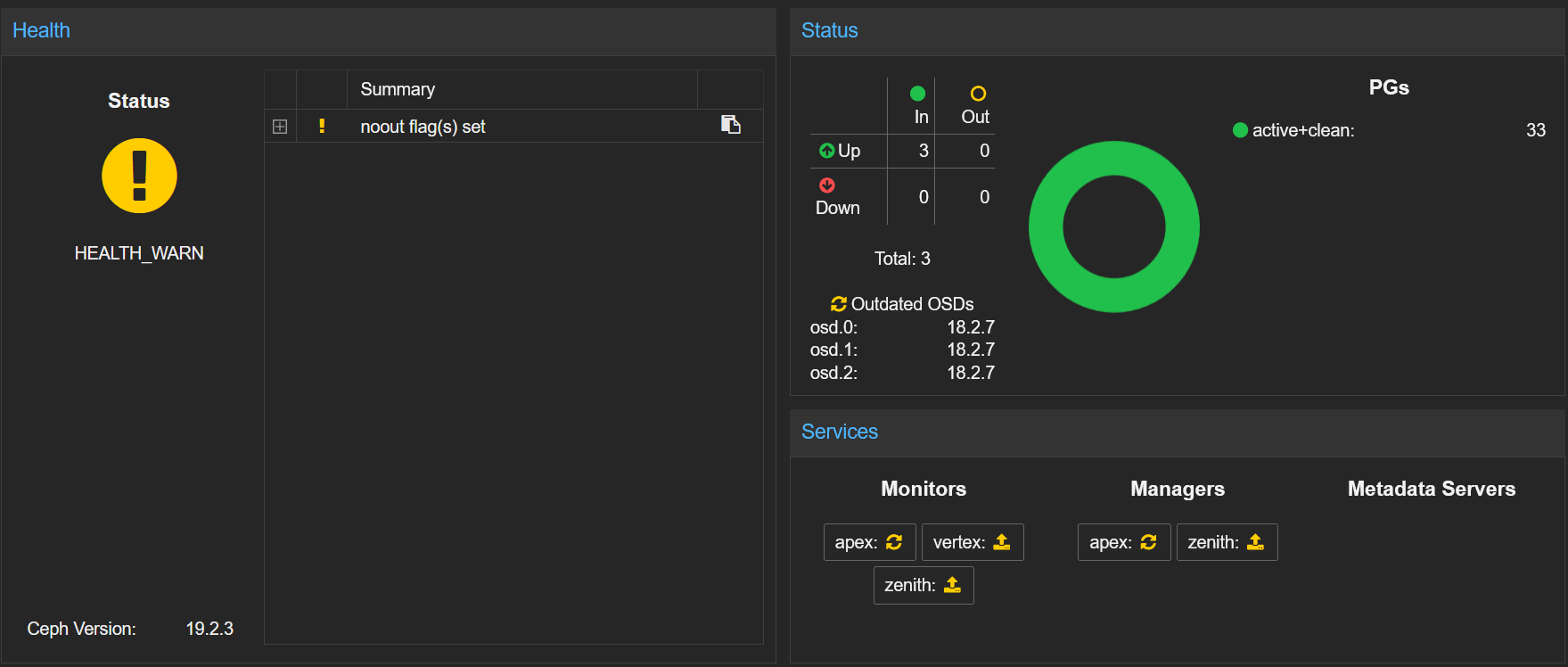
After the upgrade on the first node, the Ceph version now shows 19.2.3, I can see my OSDs appear as outdated, the monitors need either an upgrade or a restart:
I carry on and upgrade the packages on the 2 other nodes.
I have a monitor on each node, so I have to restart each monitor, one node at a time:
systemctl restart ceph-mon.target
I verify the Ceph status between each restart:
ceph status
Once all monitors are restarted, they report the latest version, with ceph mon dump:
- Before:
min_mon_release 18 (reef) - After:
min_mon_release 19 (squid)
Now I can restart the OSDs, still one node at a time. In my setup, I have one OSD per node:
systemctl restart ceph-osd.target
I monitor the Ceph status with the Proxmox WebGUI. After the restart, it is showing some fancy colors. I’m just waiting for the PGs to be back to green, it takes less than a minute:
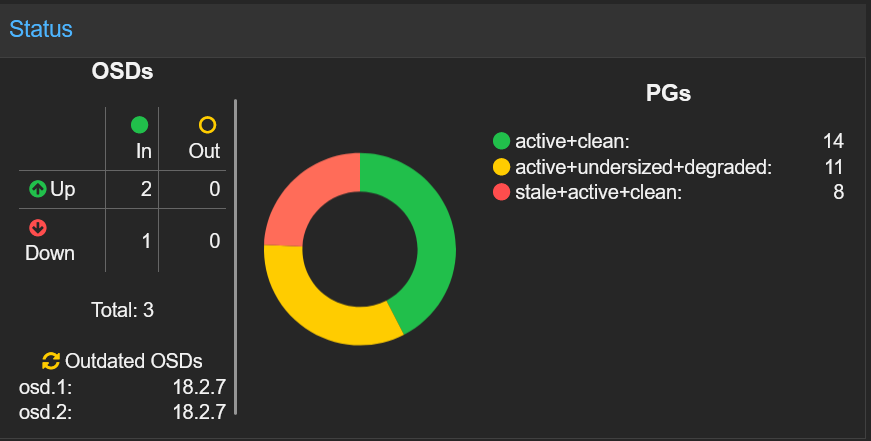
A warning shows up: HEALTH_WARN: all OSDs are running squid or later but require_osd_release < squid
Now all my OSDs are running Squid, I can set the minimum version to it:
ceph osd require-osd-release squid
ℹ️ I’m not currently using CephFS so I don’t have to care about the MDS (MetaData Server) daemon.
✅ The Ceph cluster has been successfully upgraded to Squid (19.2.3).
Checks
The prerequisites to upgrade the cluster to Proxmox VE 9 are now complete. Am I ready to upgrade? Not yet.
A small checklist program named pve8to9 is included in the latest Proxmox VE 8.4 packages. The program will provide hints and warnings about potential issues before, during and after the upgrade process. Pretty handy isn’t it?
Running the tool the first time give me some insights on what I need to do. The script checks a number of parameters, grouped by theme. For example, this is the Virtual Guest section:
= VIRTUAL GUEST CHECKS =

INFO: Checking for running guests..
WARN: 1 running guest(s) detected - consider migrating or stopping them.
INFO: Checking if LXCFS is running with FUSE3 library, if already upgraded..
SKIP: not yet upgraded, no need to check the FUSE library version LXCFS uses
INFO: Checking for VirtIO devices that would change their MTU...
PASS: All guest config descriptions fit in the new limit of 8 KiB
INFO: Checking container configs for deprecated lxc.cgroup entries
PASS: No legacy 'lxc.cgroup' keys found.
INFO: Checking VM configurations for outdated machine versions
PASS: All VM machine versions are recent enough
At the end, you have the summary. The goal is to address as many FAILURES and WARNINGS as possible:
= SUMMARY =

TOTAL:    57
PASSED:   43
SKIPPED:  7
WARNINGS: 2
FAILURES: 2
Let’s review the problems it found:
FAIL: 1 custom role(s) use the to-be-dropped 'VM.Monitor' privilege and need to be adapted after the upgrade
Some time ago, in order to use Terraform with my Proxmox cluster, I created a dedicated role. This was detailed in that post.
This role is using the VM.Monitor privilege, which is removed in Proxmox VE 9. Instead, new privileges under VM.GuestAgent.* exist. So I remove this one and I’ll add those once the cluster have been upgraded.
FAIL: systemd-boot meta-package installed. This will cause problems on upgrades of other boot-related packages. Remove 'systemd-boot' See https://pve.proxmox.com/wiki/Upgrade_from_8_to_9#sd-boot-warning for more information.
Proxmox VE usually uses systemd-boot for booting only in some configurations which are managed by proxmox-boot-tool, the meta-package systemd-boot should be removed. The package was automatically shipped for systems installed from the PVE 8.1 to PVE 8.4, as it contained bootctl in Bookworm.
If the pve8to9 checklist script suggests it, the systemd-boot meta-package is safe to remove unless you manually installed it and are using systemd-boot as a bootloader:
apt remove systemd-boot -y
WARN: 1 running guest(s) detected - consider migrating or stopping them.
In HA setup, before updating a node, I put it in maintenance mode. This automatically moves the workload elsewhere. When this mode is disabled, the workload moves back to its previous location.
WARN: The matching CPU microcode package 'amd64-microcode' could not be found! Consider installing it to receive the latest security and bug fixes for your CPU.
        Ensure you enable the 'non-free-firmware' component in the apt sources and run:
        apt install amd64-microcode
It is recommended to install processor microcode for updates which can fix hardware bugs, improve performance, and enhance security features of the processor.
I add the non-free-firmware source to the current ones:
sed -i '/^deb /{/non-free-firmware/!s/$/ non-free-firmware/}' /etc/apt/sources.list
Then install the amd64-microcode package:
apt update
apt install amd64-microcode -y
After these small adjustments, am I ready yet? Let’s find out by relaunching the pve8to9 script.
⚠️ Don’t forget to run the pve8to9 on all nodes to make sure everything is good.
Upgrade
🚀 Now everything is ready for the big move! Like I did for the minor update, I’ll proceed one node at a time, keeping my VMs and CTs up and running.
Set Maintenance Mode
First, I enter the node into maintenance mode. This will move existing workload on other nodes:
ha-manager crm-command node-maintenance enable $(hostname)
After issuing the command, I wait about one minute to give the resources the time to migrate.
Change Source Repositories to Trixie
Since Debian Trixie, the deb822 format is now available and recommended for sources. It is structured around key/value format. This offers better readability and security.
Debian Sources
cat > /etc/apt/sources.list.d/debian.sources << EOF
Types: deb deb-src
URIs: http://deb.debian.org/debian/
Suites: trixie trixie-updates
Components: main contrib non-free-firmware
Signed-By: /usr/share/keyrings/debian-archive-keyring.gpg

Types: deb deb-src
URIs: http://security.debian.org/debian-security/
Suites: trixie-security
Components: main contrib non-free-firmware
Signed-By: /usr/share/keyrings/debian-archive-keyring.gpg
EOF
Proxmox Sources (without subscription)
cat > /etc/apt/sources.list.d/proxmox.sources << EOF
Types: deb
URIs: http://download.proxmox.com/debian/pve
Suites: trixie
Components: pve-no-subscription
Signed-By: /usr/share/keyrings/proxmox-archive-keyring.gpg
EOF
Ceph Squid Sources (without subscription)
cat > /etc/apt/sources.list.d/ceph.sources << EOF
Types: deb
URIs: http://download.proxmox.com/debian/ceph-squid
Suites: trixie
Components: no-subscription
Signed-By: /usr/share/keyrings/proxmox-archive-keyring.gpg
EOF
Remove Old Bookworm Source Lists
The lists for Debian Bookworm in the old format must be removed:
rm -f /etc/apt/sources.list{,.d/*.list}
Update the Configured apt Repositories
Refresh the repositories:
apt update
Get:1 http://security.debian.org/debian-security trixie-security InRelease [43.4 kB]
Get:2 http://deb.debian.org/debian trixie InRelease [140 kB]
Get:3 http://download.proxmox.com/debian/ceph-squid trixie InRelease [2,736 B]
Get:4 http://download.proxmox.com/debian/pve trixie InRelease [2,771 B]
Get:5 http://deb.debian.org/debian trixie-updates InRelease [47.3 kB]
Get:6 http://security.debian.org/debian-security trixie-security/main Sources [91.1 kB]
Get:7 http://security.debian.org/debian-security trixie-security/non-free-firmware Sources [696 B]
Get:8 http://security.debian.org/debian-security trixie-security/main amd64 Packages [69.0 kB]
Get:9 http://security.debian.org/debian-security trixie-security/main Translation-en [45.1 kB]
Get:10 http://security.debian.org/debian-security trixie-security/non-free-firmware amd64 Packages [544 B]
Get:11 http://security.debian.org/debian-security trixie-security/non-free-firmware Translation-en [352 B]
Get:12 http://download.proxmox.com/debian/ceph-squid trixie/no-subscription amd64 Packages [33.2 kB]
Get:13 http://deb.debian.org/debian trixie/main Sources [10.5 MB]
Get:14 http://download.proxmox.com/debian/pve trixie/pve-no-subscription amd64 Packages [241 kB]
Get:15 http://deb.debian.org/debian trixie/non-free-firmware Sources [6,536 B]
Get:16 http://deb.debian.org/debian trixie/contrib Sources [52.3 kB]
Get:17 http://deb.debian.org/debian trixie/main amd64 Packages [9,669 kB]
Get:18 http://deb.debian.org/debian trixie/main Translation-en [6,484 kB]
Get:19 http://deb.debian.org/debian trixie/contrib amd64 Packages [53.8 kB]
Get:20 http://deb.debian.org/debian trixie/contrib Translation-en [49.6 kB]
Get:21 http://deb.debian.org/debian trixie/non-free-firmware amd64 Packages [6,868 B]
Get:22 http://deb.debian.org/debian trixie/non-free-firmware Translation-en [4,704 B]
Get:23 http://deb.debian.org/debian trixie-updates/main Sources [2,788 B]
Get:24 http://deb.debian.org/debian trixie-updates/main amd64 Packages [5,412 B]
Get:25 http://deb.debian.org/debian trixie-updates/main Translation-en [4,096 B]
Fetched 27.6 MB in 3s (8,912 kB/s)
Reading package lists... Done
Building dependency tree... Done
Reading state information... Done
666 packages can be upgraded. Run 'apt list --upgradable' to see them.
😈 666 packages, I’m doomed!
Upgrade to Debian Trixie and Proxmox VE 9
Launch the upgrade:
apt-get dist-upgrade -y
During the process , you will be prompted to approve changes to configuration files and some service restarts. You may also be shown the output of changes, you can simply exit there by pressing q:
/etc/issue: Proxmox VE will auto-generate this file on boot ->No/etc/lvm/lvm.conf: Changes relevant for Proxmox VE will be updated ->Yes/etc/ssh/sshd_config: Depending your setup ->Inspect/etc/default/grub: Only if you changed it manually ->Inspect/etc/chrony/chrony.conf: If you did not make extra changes yourself ->Yes
The upgrade took about 5 minutes, depending of the hardware.
At the end of the upgrade, restart the machine:
reboot
Remove Maintenance Mode
Finally when the node (hopefully) comes back, you can disable the maintenance mode. The workload which was located on that machine will come back:
ha-manager crm-command node-maintenance disable $(hostname)
Post-Upgrade Validation
- Check cluster communication:
pvecm status
-
Verify storage mounts points
-
Check Ceph cluster health :
ceph status
- Confirm VM operations, backups, and HA groups
HA groups have been removed at the profit of HA affinity rules. HA groups are automatically migrated to HA rules.
- Disable PVE Enterprise repository
If you don’t use the pve-enterprise repo, you can disable it:
sed -i 's/^/#/' /etc/apt/sources.list.d/pve-enterprise.sources
🔁 This node is now upgraded to Proxmox VE 9. Proceed to other nodes.
Post Actions
Once the whole cluster has been upgraded, proceed to post actions:
- Remove the Ceph cluster
nooutflag:
ceph osd unset noout
- Recreate PCI passthrough mapping
For the VM which I removed the host mapping at the beginning of the procedure, I can now recreate the mapping.
- Add privileges for the Terraform role
During the check phase, I was advised to remove the privilege VM.Monitor from my custom role for Terraform. Now that new privileges have been added with Proxmox VE 9, I can assign them to that role:
- VM.GuestAgent.Audit
- VM.GuestAgent.FileRead
- VM.GuestAgent.FileWrite
- VM.GuestAgent.FileSystemMgmt
- VM.GuestAgent.Unrestricted
Conclusion
🎉My Proxmox VE cluster is now is version 9!
The upgrade process was pretty smooth, without any downtime for my resources.
Now I have access to HA affinity rules, which I was needing for my OPNsense cluster.
As you could observe, I’m not maintaining my node up to date quite often. I might automate this next time, to keep them updated without any effort.